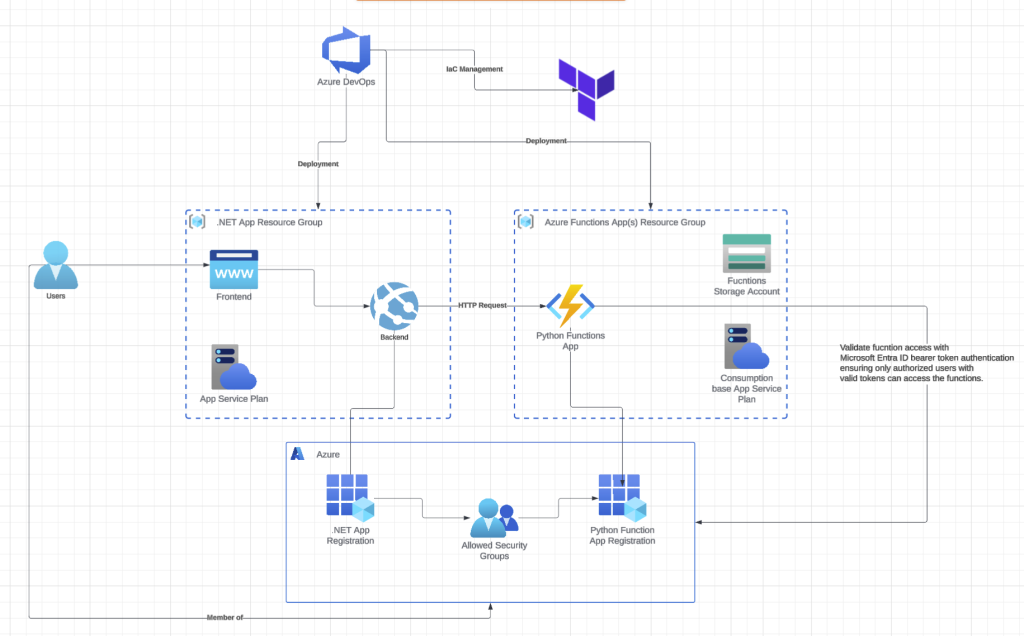
This is part 2 of my series on securely connecting a Python Azure Functions application to an existing .NET application. In my previous post, I walked through setting up the infrastructure with Terraform and deploying Python Azure Functions via Azure DevOps Pipelines. Now I’ll cover implementing authentication between the two systems using Microsoft Entra ID bearer token validation, which ensures that only requests with valid tokens from authorized users can reach your Python functions.
I drew significant inspiration from Damien Bowden‘s work on this topic, especially his detailed post on Securing Azure Functions with JWT bearer tokens from Microsoft Entra ID
In that post, Damien showed how to implement OAuth security for Azure Functions using JWT bearer tokens generated through Microsoft Entra ID app registrations. While API keys might seem like a quicker alternative, they’re unsuitable for production environments, I would say use them only during local development if at all.
After studying Damien’s approach, I became curious whether I could adapt his implementation to Python. Following considerable effort, I finally achieved a working solution.
requirements.txt
azure-functions
azure-core
azure-identity
loguru
azure-keyvault-secrets
cryptography
aiohttp
pyjwt[crypto]
numpy
local.settings.json
{
    "IsEncrypted": false,
    "Values": {
        "AzureWebJobsStorage": "UseDevelopmentStorage=true",
        "FUNCTIONS_WORKER_RUNTIME": "python",
        "AzureKeyVaultEndpoint": "https://myapp.vault.azure.net/",
        "AzureAd__Domain": "mytenant.onmicrosoft.com",
        "AzureAd__TenantId": "AzureAd__TenantId",
        "AzureAd__ClientId": "AzureAd__ClientId",
        "AzureAd__Instance": "https://login.microsoftonline.com/",
        "AzureAd__SkipUnrecognizedRequests": "true"
    }
}
auth_error.py
class AuthError(Exception):
    def __init__(self, error, status_code):
        self.error = error
        self.status_code = status_code
        super().__init__(error)
entra_id_jwt_bearer_validation.py
Onto the real meat and potatoes of this post, the Microsoft Entra ID bearer token validation.
At its core, this security model is built on a simple but powerful principle:
Entra ID (Token Issuer): Signs JWTs with a private key
Entra ID generates tokens and signs them using a private key.
Functions Application (Token Validator): Verifies JWTs using Azure’s public key from JWKS.
The Python Functions receive tokens and verify them using a public key from Entra ID, which is available through the JWKS (JSON Web Key Set) endpoint.
In short, the entra_id_jwt_bearer_validation class uses your Microsoft Entra ID configuration to discover Azure Active Directory’s well-known endpoints for your tenant. It asynchronously fetches the JWKS (JSON Web Key Set), validates the access token’s signature against OAuth standards, and checks that the required scope (access_as_user) is present. The decoded token claims are returned and can be accessed directly in the Azure Functions app.
import jwt
import json
import base64
import os
from loguru import logger
from cryptography.hazmat.primitives.asymmetric.rsa import RSAPublicNumbers
from cryptography.hazmat.backends import default_backend
from cryptography.hazmat.primitives import serialization
import aiohttp  # Replace urllib with aiohttp

from auth_error import AuthError

"""
Azure (Token Issuer): Signs JWTs with their private key
Application (Token Validator): Verifies JWTs using Azure's public key from JWKS
Key Separation: Never have access to the private key, only the public key
"""

class entra_id_jwt_bearer_validation:
    def __init__(self):
        self.azure_ad_client_id = os.environ.get("AzureAd__ClientId")
        self.azure_ad_tenant_id = os.environ.get("AzureAd__TenantId")
        self.jwks_url = f"https://login.microsoftonline.com/{self.azure_ad_tenant_id}/discovery/v2.0/keys"
        # Change this line to match the v2.0 format:
        self.issuer_url = f"https://login.microsoftonline.com/{self.azure_ad_tenant_id}/v2.0"
        self.audience = self.azure_ad_client_id
        self.scope_type = "https://schemas.microsoft.com/identity/claims/scope"
        self.required_scope = "access_as_user"

    async def validate_authorization_header_async(self, authorization_header: str):
        """Validate authorization header"""
        if not authorization_header:
            logger.warning("No authorization header provided")
            raise AuthError("Authorization header missing", 401)

        if not authorization_header.startswith("Bearer "):
            logger.warning("Invalid authorization header format")
            raise AuthError("Invalid authorization header", 401)

        token = authorization_header[7:]

        try:
            decoded_token = await self.get_valid_token_async(token)
            logger.info("Token validation successful", user_id=decoded_token.get("oid", "unknown"))
            return decoded_token
        except AuthError:
            raise
        except Exception as e:
            logger.error("Unexpected validation error", error=str(e))
            raise AuthError("Token validation failed", 401)

    async def get_valid_token_async(self, token):
        """Validate JWT token"""
        try:
            # Fetch JWKS keys asynchronously
            jwks = await self.fetch_jwks_async()
            unverified_header = jwt.get_unverified_header(token)

            # Find the matching key (synchronous - just dict lookup)
            rsa_key = self.find_rsa_key(jwks, unverified_header)
            if not rsa_key:
                raise AuthError("Unable to find matching key", 401)

            # Create public key and decode token (synchronous - crypto operations)
            public_key = self.rsa_pem_from_jwk(rsa_key)
            decoded_token = jwt.decode(
                token,
                public_key,
                verify=True,
                algorithms=["RS256"],
                audience=self.audience,
                issuer=self.issuer_url
            )

            # Validate scope (synchronous - just checking dict values)
            if not self.is_scope_valid(self.required_scope, decoded_token):
                raise AuthError("Invalid scope", 403)

            return decoded_token

        except jwt.ExpiredSignatureError:
            raise AuthError("Token has expired", 401)
        except jwt.InvalidTokenError as e:
            raise AuthError(f"Invalid token: {str(e)}", 401)
        except Exception as e:
            raise AuthError(f"Error validating token: {e}", 401)

    async def fetch_jwks_async(self):
        """Fetch JWKS keys asynchronously"""
        async with aiohttp.ClientSession() as session:
            async with session.get(self.jwks_url) as response:
                if response.status != 200:
                    raise AuthError(f"Failed to fetch JWKS: {response.status}", 401)
                content = await response.read()
                return json.loads(content)

    def is_scope_valid(self, scope_name: str, decoded_token: dict) -> bool:
        """Validate if the required scope is present in the token - SYNC"""
        # Check for 'scp' claim first (standard Azure AD claim)
        scope_claim = decoded_token.get("scp", "")

        # Fallback for MS mapping - check the full scope type URI
        if not scope_claim:
            scope_claim = decoded_token.get(self.scope_type, "")

        if not scope_claim:
            logger.warning("Scope invalid - no scope claim found", scope_name=scope_name)
            return False

        # For space-delimited scopes (like "scope1 scope2"), split and check each
        if isinstance(scope_claim, str):
            token_scopes = scope_claim.split()
            for token_scope in token_scopes:
                if token_scope.lower() == scope_name.lower():
                    logger.debug("Scope valid", scope_name=scope_name)
                    return True

        logger.warning("Scope invalid - required scope not found",
                       scope_name=scope_name,
                       found_scopes=scope_claim)
        return False

    @staticmethod
    def find_rsa_key(jwks, unverified_header):
        # SYNC - just dictionary operations
        for key in jwks["keys"]:
            if key["kid"] == unverified_header["kid"]:
                return {
                    "kty": key["kty"],
                    "kid": key["kid"],
                    "use": key["use"],
                    "n": key["n"],
                    "e": key["e"]
                }
        return None

    @staticmethod
    def ensure_bytes(key):
        if isinstance(key, str):
            key = key.encode('utf-8')
        return key

    @staticmethod
    def decode_value(val):
        decoded = base64.urlsafe_b64decode(entra_id_jwt_bearer_validation.ensure_bytes(val) + b'==')
        return int.from_bytes(decoded, 'big')

    @staticmethod
    def rsa_pem_from_jwk(jwk):
        return RSAPublicNumbers(
            n=entra_id_jwt_bearer_validation.decode_value(jwk['n']),
            e=entra_id_jwt_bearer_validation.decode_value(jwk['e'])
        ).public_key(default_backend()).public_bytes(
            encoding=serialization.Encoding.PEM,
            format=serialization.PublicFormat.SubjectPublicKeyInfo
        )
How This Works in Practice
When a user accesses your Python Functions, here’s what happens:
- User Authentication: The user authenticates with Entra ID and receives a JWT token signed by Azure using their private key.
- Token Transmission: The (authorised) user sends this token to the Python Functions app in the Authorization header as a bearer token.
- Token Verification: The application downloads Azure’s public key from the JWKS endpoint and uses it to verify that the token signature is valid. This proves the token genuinely came from Azure and hasn’t been tampered with.
- Access Grant or Denial: If the signature is valid and the required scopes are present, grant access. Otherwise, reject the request.
The RSA key construction from JWK format was adapted from Roberto Prevato’s excellent post, Validating JSON web tokens (JWTs) from Azure AD, in Python. His detailed explanation of using the cryptography library’s RSAPublicNumbers class made porting this logic to handle Entra ID bearer tokens much clearer. Essentially, Python’s cryptography library doesn’t have a single built-in method like C# does to say “convert this JWK to a usable RSA key.”
Instead, it requires you to:
- Manually serialize them to PEM format
- Manually decode the base64url components
- Manually create
RSAPublicNumbersobjects
function_app.py
I made use of the concept of blueprints which was introduced in the Python v2 programming model.
A blueprint is a separate class that lets you organize and register functions outside your main function application. The function runtime doesn’t automatically index blueprint functions, you need to explicitly register them in the function app.
Blueprints offer two key advantages: they allow you to modularize your code by splitting functions across multiple files, and they let you create reusable function APIs that other projects can build on.
For this post, I’ll keep things simple with a basic example.
import azure.functions as func
from simple import simple_bp

app = func.FunctionApp()

# Register the blueprint
app.register_blueprint(simple_bp)
simply.py
import json
import azure.functions as func
from loguru import logger
from auth_error import AuthError
from entra_id_jwt_bearer_validation import entra_id_jwt_bearer_validation

# Initialize validator once at module level
entra_token_validator = entra_id_jwt_bearer_validation()

simple_bp = func.Blueprint()

@simple_bp.function_name('auth-test')
@simple_bp.route(route="auth-test", methods=["GET"], auth_level=func.AuthLevel.ANONYMOUS)
async def test_simple(req: func.HttpRequest) -> func.HttpResponse:
    try:
        # Validate JWT token first
        auth_header = req.headers.get("Authorization")
        decoded_token = await entra_token_validator.validate_authorization_header_async(auth_header)

        # Now have access to user claims
        user_oid = decoded_token.get("oid")
        user_name = decoded_token.get("name", "unknown")

        logger.info("Auth test successful", user_oid=user_oid, user_name=user_name)

        return func.HttpResponse(
            json.dumps({"message": "Test successful", "user": user_name}),
            status_code=200,
            mimetype="application/json"
        )

    except AuthError as e:
        logger.error("Authentication failed", error=str(e.error), status_code=e.status_code)
        return func.HttpResponse(
            json.dumps({"error": e.error}),
            status_code=e.status_code,
            mimetype="application/json"
        )

    except Exception as e:
        logger.error("Unexpected error in auth-test", error=str(e), exc_info=True)
        return func.HttpResponse(
            json.dumps({"error": "Internal server error"}),
            status_code=500,
            mimetype="application/json"
        )
PythonAuthTestController.cs
using System;
using System.Security.Claims;
using System.Text.Json;
using System.Threading.Tasks;
using Microsoft.AspNetCore.Authentication.Cookies;
using Microsoft.AspNetCore.Authorization;
using Microsoft.AspNetCore.Mvc;
using Microsoft.Extensions.Configuration;
using Microsoft.Extensions.Logging;

[ValidateAntiForgeryToken]
[Authorize(AuthenticationSchemes = CookieAuthenticationDefaults.AuthenticationScheme)]
[ApiController]
[Route("api/[controller]")]
public class PythonAuthTestController : ControllerBase
{
  private readonly AppToFunctionsHttpClientFactory _clientFactory;
  private readonly string? _baseUrl;
  private readonly ILogger<PythonAuthTestController> _logger;

  public PythonAuthTestController(
      AppToFunctionsHttpClientFactory clientFactory,
      ILogger<PythonAuthTestController> logger,
      IConfiguration configuration)
   {
       _clientFactory = clientFactory;
       _baseUrl = configuration["PythonExtensions:AppUrl"];
       _logger = logger;
   }

   [HttpGet("py-auth-test")]
   public async Task<IActionResult> Run()
   {
       var userOid = User.FindFirst("oid")?.Value ?? User.FindFirst(ClaimTypes.NameIdentifier)?.Value;

       if (string.IsNullOrEmpty(userOid))
       {
           _logger.LogWarning("Unable to extract user OID");
           return Unauthorized(new { error = "User identification failed" });
       }

       var url = $"{_baseUrl}/api/auth-test";
       var client = await _clientFactory.CreateClientAsync(Functions.PythonExtensions, userOid);
       var response = await client.GetAsync(url);

       if (!response.IsSuccessStatusCode)
       {
          var errorContent = await response.Content.ReadAsStringAsync();
          _logger.LogWarning("Python auth-test failed with status {StatusCode}", response.StatusCode);
                return StatusCode((int)response.StatusCode, new { error = errorContent });
        }

       var responseContent = await response.Content.ReadAsStringAsync();
       _logger.LogInformation("Python auth-test completed successfully for user {UserOid}", userOid);

       var result = JsonSerializer.Deserialize<string>(responseContent);
       return Ok(result);
   }
}
AppToFunctionsHttpClientFactory.cs
public class AppToFunctionsHttpClientFactory
{
    private readonly IHttpClientFactory _httpClientFactory;
    private readonly AppToFunctionsTokenService _appToFunctionsTokenService;

    public AppToFunctionsHttpClientFactory(IHttpClientFactory httpClientFactory, AppToFunctionsTokenService appToFunctionsTokenService)
    {
        _httpClientFactory = httpClientFactory;
        _appToFunctionsTokenService = appToFunctionsTokenService;
    }

    public async Task<HttpClient> CreateClientAsync(Functions function, string userOid)
    {
        // Create client and set the connection base address
        var client = _httpClientFactory.CreateClient(function.ToString());
        var accessToken = await _appToFunctionsTokenService.GetTokenAsync(function, userOid);
        client.DefaultRequestHeaders.Authorization = new AuthenticationHeaderValue("Bearer", accessToken);
        client.DefaultRequestHeaders.Accept.Add(new MediaTypeWithQualityHeaderValue("application/json"));
        return client;
    }
}
AppToFunctionsTokenService.cs
public class AppToFunctionsTokenService
{
    private readonly ILogger<AppToFunctionsTokenService> _logger;
    private readonly IConfiguration _configuration;
    private readonly ClientCredentialsFlowService _clientCredentialsFlow;
    private readonly ITokenAcquisition _tokenAcquisition;

    public AppToFunctionsTokenService(IConfiguration configuration, ILoggerFactory loggerFactory, ClientCredentialsFlowService clientCredentialsFlow, ITokenAcquisition tokenAcquisition)
    {
        _logger = loggerFactory.CreateLogger<AppToFunctionsTokenService>();
        _clientCredentialsFlow = clientCredentialsFlow;
        _tokenAcquisition = tokenAcquisition;
        _configuration = configuration;
    }

    public async Task<string> GetTokenAsync(Functions function, string userOid)
    {
        var cacheKey = $"azfunc_token_{function.ToString()}_{userOid}";

        var cachedToken = await _clientCredentialsFlow.GetFromCacheAsync(cacheKey);
        if (cachedToken == null || cachedToken.ExpiresIn <= DateTime.UtcNow)
        {
            return await GetNewAccessTokenAsync(function, userOid, cacheKey);
        }

        _logger.LogInformation("Using cached token for {Function} and user {UserId}", function, userOid);
        return cachedToken.AccessToken;
        // Get a fresh token
    }

    private async Task<string> GetNewAccessTokenAsync(Functions function, string userOid, string cacheKey)
    {
        var scope = _configuration[$"{function.ToString()}:ScopeForAccessToken"];
        var accessToken = await _tokenAcquisition.GetAccessTokenForUserAsync([scope]);

        // Cache with expiration (tokens typically last 60 minutes)
        var tokenResult = new ClientCredentialsFlowService.AccessTokenResult
        {
            AccessToken = accessToken,
            ExpiresIn = DateTime.UtcNow.AddMinutes(55) // Cache for 55min of 60min token life
        };

         _clientCredentialsFlow.AddToCache(cacheKey, tokenResult);
         _logger.LogInformation("Acquired fresh token for {Function} and user {UserId}", function, userOid);

         return accessToken;
    }
}
ClientCredentialsFlowService.cs
public class ClientCredentialsFlowService
{
    private readonly IDistributedCache _cache;
    private const int CACHE_EXPIRATION_DAYS = 1;

    public ClientCredentialsFlowService(IDistributedCache cache)
    {
        _cache = cache;
    }

    public void AddToCache(string key, AccessTokenResult accessTokenItem)
    {
        var options = new DistributedCacheEntryOptions().SetSlidingExpiration(TimeSpan.FromDays(CACHE_EXPIRATION_DAYS));
        var serializedItem = JsonSerializer.Serialize(accessTokenItem);
        _cache.SetStringAsync(key, serializedItem, options);
    }

    public async Task<AccessTokenResult?> GetFromCacheAsync(string key)
    {
        var item = await _cache.GetStringAsync(key);
        return item != null ? JsonSerializer.Deserialize<AccessTokenResult>(item) : null;
    }

    public class AccessTokenResult
    {
        public string AccessToken { get; set; } = string.Empty;
        public DateTime ExpiresIn { get; set; }
    }

    public class AccessTokenItem
    {
        [JsonPropertyName("access_token")]
        public string AccessToken { get; set; } = string.Empty;

        [JsonPropertyName("expires_in")]
        public int ExpiresIn { get; set; }

        [JsonPropertyName("token_type")]
        public string TokenType { get; set; } = string.Empty;

        [JsonPropertyName("scope")]
        public string Scope { get; set; } = string.Empty;
    }
}
Implementing JWT bearer token validation in Python Azure Functions might seem complex at first, but it solves an elegant problem: how do you trust tokens from an external party without constantly communicating with them? The answer lies in asymmetric cryptography.
Azure signs access tokens once with a private key, and the functions application verifies them thousands of times using a public key. This means no private key ever leaves Azure’s control, yet the application can operate completely independently while maintaining absolute trust in the token’s authenticity. This is the foundation that makes the entire entra_id_jwt_bearer_validation class work.
By following this pattern, you can build a secure, scalable authentication system that validates user identity without creating bottlenecks or dependencies on Azure’s availability. Your Python Functions can confidently authorize requests based on cryptographic proof, not just network calls.
For more security, you could consider deploying your functions app in a Azure Virtual Network and then access to the Azure Functions app is restricted so that it cannot be reach from the Internet. Only Applications deployed in the same VNET can access the Azure Functions however, this is a little overkill for the purposes of this series.
Bearer token authentication seems like a solid approach for securing Azure Functions; I found some complementary information on ….. that helped clarify a few points about Entra ID.