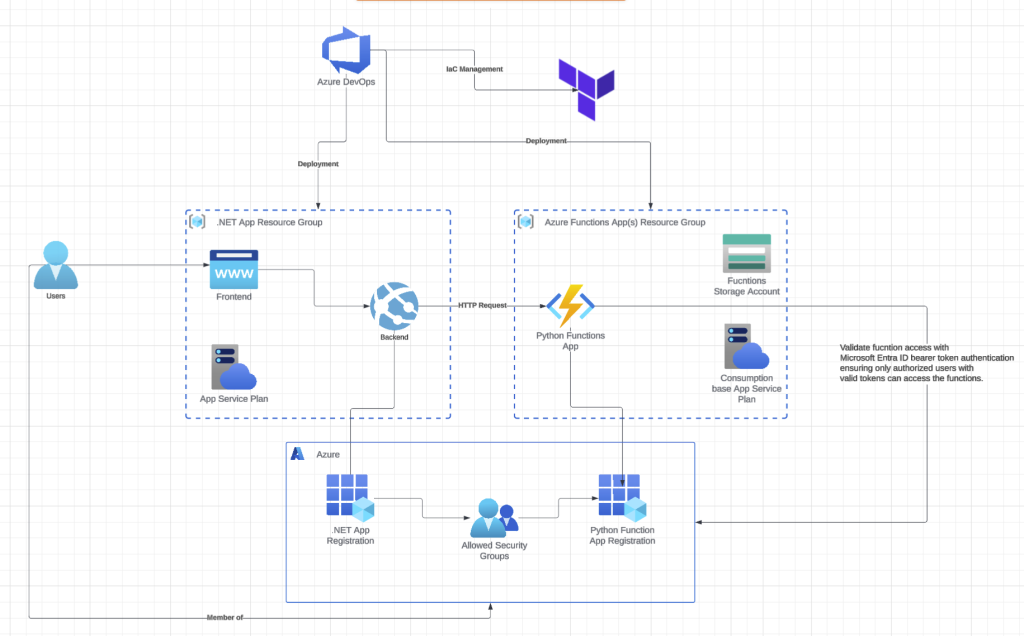
Ah, C# – such a versatile and powerful language with excellent support across the board. Yet ask any AI or data science specialist, and they’ll tell you it’s simply not the right tool for their work. Python remains their language of choice. Recently, a colleague reached out to me with a challenge. He’d been assigned to integrate AI features into an existing .NET monolithic application. Without access to libraries like Pandas and Polars, he was hitting significant roadblocks and asked if I knew of any workarounds. My suggestion was to extract the AI functionality into a separate Azure Functions app, which would provide the added benefit of dynamic resource scaling. After considerable amount of crying, complaining and arguing, I successfully developed a solution for him.
In this two-part series, I’ll walk you through exactly what I built and the approach I took to make it work.
Part 1 (this post): Setting up the complete infrastructure using Terraform and deploying Python Azure Functions through Azure DevOps Pipelines. I’ll provision resource groups, storage accounts, function apps, and all the supporting infrastructure as code.
Part 2: Implementing Microsoft Entra ID bearer token authentication to secure your Python Azure Functions, ensuring only authorized users with valid tokens can access the functions.
By the end, you’ll have a production-ready, secure, and scalable Python Azure Functions deployment that integrates seamlessly with .NET applications. All infrastructure will be version-controlled and reproducible through Terraform, and the deployment pipeline will be fully automated.
Let’s dive into the infrastructure provisioning.
Infrastructure Provisioning Using Terraform
main-functions.tf
# Resource Group for functions
resource "azurerm_resource_group" "rg_functions" {
    name     = "rg-functions"
    location = "West Europe"
    tags     = { description = "Azure functions resource group" }
}


resource "azuread_group" "role-rg-functions-contributor" {
    display_name            = format("ra-%s-contributor", azurerm_resource_group.rg_functions.name)
    description             = "Role group which grants contributor access to the Azure Functions resource group"
    prevent_duplicate_names = true
    security_enabled        = true
    members                 = [
        data.azurerm_client_config.current.object_id, # Your current user Azure ObjectId
        azuread_service_principal.azuredevops.object_id # Azure DevOps pipeline service principal
    ]
    lifecycle {
        # apart from setting initially; do not flag changes in members and owners as state change
        ignore_changes = [members, owners]
    }
}


resource "azuread_group" "perm-rg-functions-contributor" {
    display_name            = format("pm-%s-contributor", azurerm_resource_group.rg_functions.name)
    description             = "Permission group granting contributor rights to the group"
    members                 = [azuread_group.role-rg-functions-contributor.id]
    prevent_duplicate_names = true
    security_enabled        = true
    lifecycle {
        # apart from setting initially; do not flag changes in owners as state change
        ignore_changes = [owners]
    }
}


resource "azurerm_role_assignment" "azuredevops-rg-functions-contributor" {
    scope                = azurerm_resource_group.rg_functions.id
    role_definition_name = "Contributor"
    principal_id         = azuread_service_principal.azuredevops.id
}


resource "azurerm_service_plan" "functions_appplan" {
    name                                  = "appplan-functions"
    resource_group_name                   = azurerm_resource_group.rg_functions.name
    location                              = var.default_location
    os_type                               = "Linux"
    sku_name                              = "Y1" # THIS IS CRITICAL TO ENSURE DYNAMIC UPSCALING
}


resource "azurerm_storage_account" "sa_functions" {
# Place to store the functions app(s) codebase(s)
    name                     = "functionssa"
    resource_group_name      = azurerm_resource_group.rg_functions.name
    location                 = "West Europe"
    account_tier             = "Standard"
    account_replication_type = "LRS"
    min_tls_version          = "TLS1_2"
    tags = merge(var.service_tags, {
        description = "Functions Runtime Storage"
    })
}
NOTE
The Y1 SKU corresponds to Azure’s Consumption Plan, but Microsoft has announced that after October 1, 2028, Linux function apps will no longer be supported on the traditional Consumption plan.
Microsoft suggests migrating to the Flex Consumption plan, which provides benefits like faster scaling, reduced cold start times, private networking capabilities, and enhanced performance and cost management.
For now, I’m sticking with the standard Consumption plan since Terraform support is still catching up and the migration isn’t as straightforward as a simple configuration change. However, if you want to get ahead of this transition, I’d recommend exploring the documentation
main-pythonfunctionsapp.tf
resource "azurerm_linux_function_app" "pythonfunctionsapp" {
    name                = "python-functions"
    resource_group_name = azurerm_resource_group.rg_functions.name
    location            = "West Europe"

    storage_account_name       = azurerm_storage_account.sa_functions.name
    storage_account_access_key = azurerm_storage_account.sa_functions.primary_access_key
    service_plan_id            = azurerm_service_plan.functions_appplan.id
    https_only                 = true

    tags = { description = "Python Functions App" }

    identity {
        type = "SystemAssigned"
    }

    site_config {
        application_stack {
            python_version = "3.12"
        }
        application_insights_connection_string = azurerm_application_insights.appi.connection_string

        health_check_path   = "/api/health"
        health_check_eviction_time_in_min = 10

        http2_enabled = true
    }

    app_settings = {
        # Azure AD Configuration for the FUNCTIONS API
        "AzureAd__Domain"                       = data.azuread_domains.aad_domains.domains[0].domain_name
        "AzureAd__TenantId"                     = var.tenant_id
        "AzureAd__ClientId"                     = azuread_application.pythonfunctionsaadapp.client_id
        "AzureAd__Instance"                     = "https://login.microsoftonline.com/"
        "AzureAd__Authority"                    = "https://login.microsoftonline.com/${var.tenant_id}"

        # Key Vault Configuration
        "AzureKeyVaultEndpoint"                 = azurerm_key_vault.kv.vault_uri

        # Application Insights
        "APPLICATIONINSIGHTS_CONNECTION_STRING" = azurerm_application_insights.appi.connection_string

        "SCM_DO_BUILD_DURING_DEPLOYMENT" = "true"
        "ENABLE_ORYX_BUILD" = "true"

        WEBSITE_RUN_FROM_PACKAGE = ""
        WEBSITE_MOUNT_ENABLED    = "true"
    }

    lifecycle {
        ignore_changes = [
            app_settings["WEBSITE_RUN_FROM_PACKAGE"],
            app_settings["WEBSITE_MOUNT_ENABLED"]
        ]
    }
}

resource "azurerm_role_assignment" "python-functions-app-kv-reader-ra" {
    scope                = azurerm_key_vault.kv.id
    role_definition_name = "Key Vault Secrets User"
    principal_id         = azurerm_linux_function_app.pythonfunctionsapp.identity[0].principal_id
}


resource "azuread_application" "pythonfunctionsaadapp" {
    display_name     = "Python Functions API %s"
    identifier_uris  = ["api://python-functions"]
    sign_in_audience = "AzureADMyOrg"

    api {
        requested_access_token_version = 2

        # API scope that the main app will request
        oauth2_permission_scope {
            admin_consent_description = "Allow the application to access python functions on behalf of the signed-in user"
            admin_consent_display_name = "Access python functions"
            enabled                    = true
            id                         = random_uuid.random-uuid-app-role-pythonfunctionsapp.result # Unique ID
            type                       = "User"
            user_consent_description   = "Allow the application to access python functions on your behalf"
            user_consent_display_name  = "Access python functions"
            value                      = "access_as_user" #"Functions.Access"
        }
    }


    # App role for users who can access the functions
    app_role {
        id                   = random_uuid.random-uuid-app-role-dotnet-app-users.result
        allowed_member_types = ["User"]
        description          = "Users who can access python functions"
        display_name         = "PythonFunctionsUser"
        enabled              = true
        value                = "PythonFunctionsUser"
    }

}

resource "azuread_service_principal" "python-functions-app-sp" {
    client_id = azuread_application.pythonfunctionsaadapp.client_id
}


resource "azuread_application_password" "pythonfunctionsapppwd" {
    display_name      = "apppwd"
    application_id    = azuread_application.pythonfunctionsaadapp.id
    end_date_relative = "17520h"
}


resource "azurerm_key_vault_secret" "pythonfunctionsapppwd-secret" {
    key_vault_id = azurerm_key_vault.kv.id
    name         = "Python--ClientSecret"
    value        = azuread_application_password.pythonfunctionsapppwd.value
}
The decision to use Python 3.12 rather than 3.13 was based on Azure Functions Flex consumption plan compatibility, where 3.12 represents the highest supported Python version currently available. https://learn.microsoft.com/en-us/azure/azure-functions/flex-consumption-plan
main-uuids.tf
resource "random_uuid" "random-uuid-app-role-pythonfunctionsapp" {}
resource "random_uuid" "random-uuid-app-role-dotnet-app-users" {}
main-add.tf
resource "azuread_application" "aadapp" {
  display_name     = "Dotnet AAD Application"
  identifier_uris  = ["api://dotnetapp"]
  sign_in_audience = "AzureADMyOrg"
  api {
    requested_access_token_version = 2
  }

  # Other configurations...

  # Required to access the Python Functions app
    required_resource_access {
        resource_app_id = azuread_application.pythonfunctionsaadapp.client_id
        resource_access {
            id   = random_uuid.random-uuid-app-role-pythonfunctionsapp.result
            type = "Scope"
        }
    }
}
Deployment with Azure DevOps Pipelines
python-functions-app.yml
name: PythonFunctions$(Date:yyyyMMdd)$(Rev:r)
trigger:
    batch: true
    branches:
        include:
            - main
    paths:
        include:
            - src

variables:
    isMainBranch: $[eq(variables['Build.SourceBranch'], 'refs/heads/main')]
    artifactName: "PythonFunctionsApp"
    functionAppPath: "src/Functions.Python"
    pythonVersion : "3.12"
pool:
    vmImage: ubuntu-latest

stages:
    - stage: Build
      displayName: Build and Package
      dependsOn: []
      jobs:
          - template: jobs-build-functions.yml
            parameters:
                artifactName: $(artifactName)
                functionAppPath: $(functionAppPath)
                pythonVersion: $(pythonVersion)

    - stage: DeployProd
      displayName: Deploy to PROD
      dependsOn: Build
      condition: and(succeeded(), eq(variables.isMainBranch, true))
      jobs:
          - template: jobs-deploy-functions.yml
            parameters:
                artifactName: $(artifactName)
                environment: Production
                environmentCode: p1
                serviceConnection: azuredevops-service-connection
                functionsAppName: pythonfunctionsapp
jobs-build-functions.yml
parameters:
    - name: functionAppPath
      type: string
    - name: buildConfiguration
      type: string
      default: "Release"
    - name: artifactName
      type: string
    - name: pythonVersion
      type: string
      default: "3.12"

jobs:
    - job: Build
      displayName: Build Python Azure Functions
      pool:
          vmImage: ubuntu-latest

      steps:
          - task: UsePythonVersion@0
            displayName: "Set Python version to ${{ parameters.pythonVersion }}"
            inputs:
                versionSpec: '${{ parameters.pythonVersion }}'
                architecture: 'x64'


          # Install dependencies following Microsoft's pattern
          - bash: |
                cd '${{ parameters.functionAppPath }}'
                if [ -f extensions.csproj ]
                then
                    dotnet build extensions.csproj --output ./bin
                fi
                pip install --target="./.python_packages/lib/site-packages" -r ./requirements.txt
            displayName: 'Install dependencies'


          # Archive files to the staging directory
          - task: ArchiveFiles@2
            displayName: 'Archive Azure Functions'
            inputs:
                rootFolderOrFile: "${{ parameters.functionAppPath }}"
                includeRootFolder: false
                archiveFile: "$(Build.ArtifactStagingDirectory)/publish/function-app.zip"


          # Publish using the modern syntax
          - publish: $(Build.ArtifactStagingDirectory)/publish
            artifact: ${{ parameters.artifactName }}
            displayName: 'Publish Function App artifact'
jobs-deploy-functions.yml
parameters:
    - name: "artifactName"
      type: string
    - name: "environment"
      type: string
    - name: "environmentCode"
      type: string
    - name: "serviceConnection"
      type: string
    - name: "functionsAppName"
      type: string

jobs:
    - deployment: Deploy
      displayName: "Deploy ${{parameters.functionsAppName}}"
      environment: ${{parameters.environment}}
      strategy:
          runOnce:
              deploy:
                  steps:
                      - checkout: self
                      - download: current
                        displayName: Artifacts - Download function app artifact
                        artifact: ${{ parameters.artifactName }}
                      - task: AzureFunctionApp@2
                        displayName: Deploy Azure Function App
                        inputs:
                            azureSubscription: ${{parameters.serviceConnection}}
                            appType: functionAppLinux
                            appName: ${{parameters.functionsAppName}}
                            package: $(Pipeline.Workspace)/${{ parameters.artifactName }}/**/*.zip
And voilà! Every component of your Azure Functions environment is now version-controlled, reproducible, and auditable.
From resource groups to storage accounts, from app service plans to Entra ID applications, everything is defined in Terraform.
Azure DevOps pipelines automatically build, package, and deploy your Python functions whenever you push to main.
The pipeline handles Python dependencies, creates deployment packages, and pushes them to Azure
all without manual intervention.
A special thanks to Marc Rufer for taking the time to review my Terraform code and pipelines
1 Comment.